 ctrlhq
Display brightness
Every screen's brightness, in one place.
A slider for each display, including external monitors. Contrast and speaker volume too, where the monitor supports them.
14-day money-back guaranteeAlready bought? Download
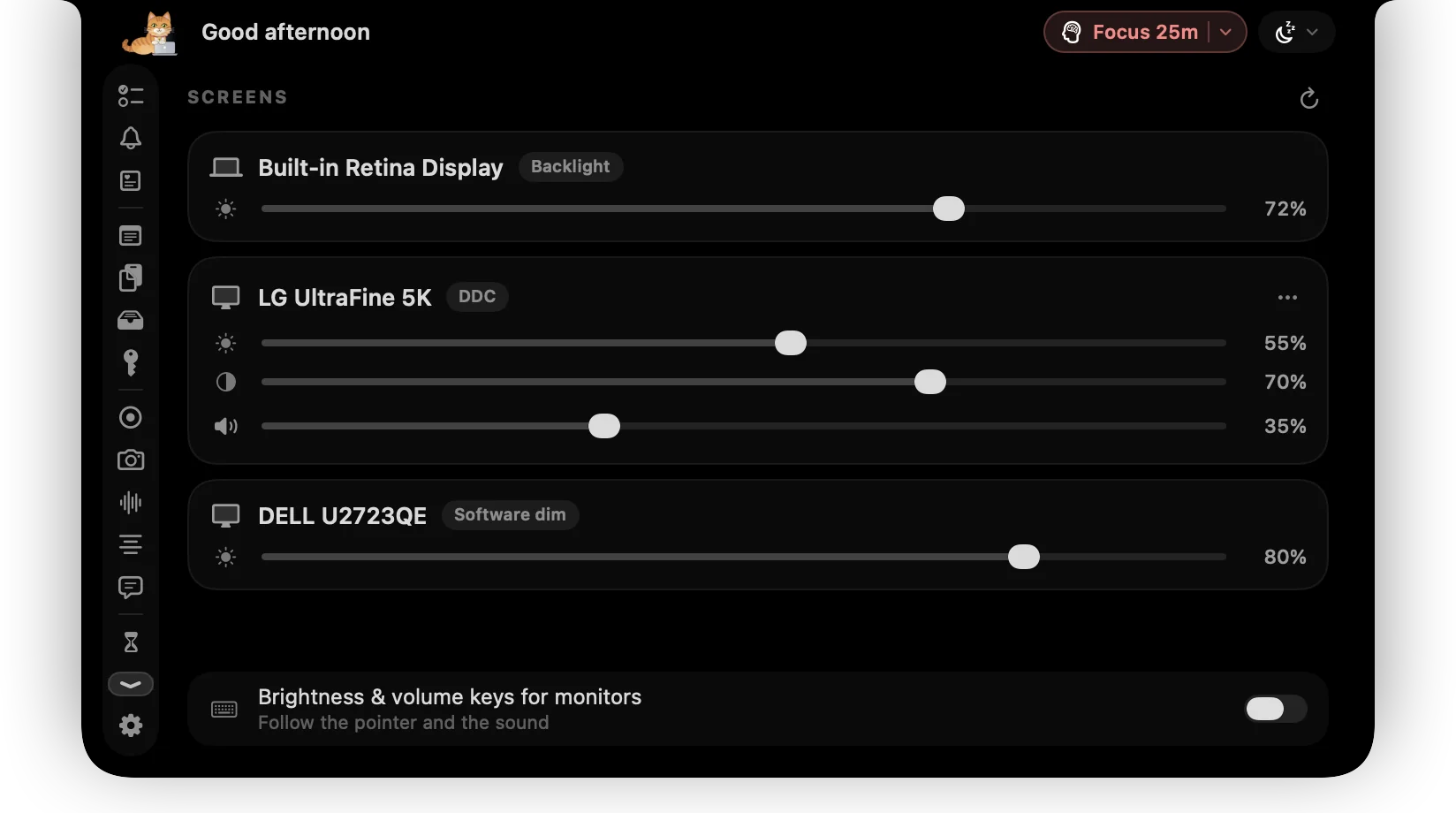
macOS only lets you change the brightness of Apple displays. Everything else means reaching for the buttons under the monitor and paging through its menus.
ctrlhq lists every connected screen with its own slider. It talks to the monitor directly over the cable (DDC/CI), so the backlight really changes, just like pressing the monitor's own buttons. When a monitor or adapter won't answer, ctrlhq dims the picture instead.
What you get
Real brightness
The built-in panel and Apple displays use the Mac's own backlight control. Other monitors get DDC/CI, the same commands their buttons send.
Contrast and volume
Monitors that support it also get contrast, speaker volume and mute.
Works through anything
Many USB-C adapters and docks block DDC. ctrlhq notices and dims in software instead, and never goes fully black.
Brightness keys for every screen
Turn it on and the brightness keys adjust whichever display the pointer is on. Volume keys reach the monitor's speakers when that's where the sound is going.
Remembers each monitor
Levels come back when you plug a monitor back in, and after sleep.
How it works
- 1Open the Displays tab in the notch.
- 2Drag a monitor's slider.
- 3Optionally, turn on brightness and volume keys below the sliders.
Questions
Is this like MonitorControl or Lunar?
Same approach (DDC with a software fallback), built into the notch, so there's no extra menu bar app.
Why does my monitor say Software dim?
It isn't answering DDC. That's common through USB-C to HDMI adapters, some docks and DisplayLink. A direct USB-C or DisplayPort cable usually works. Software dimming can darken the picture but can't go brighter than the monitor's own setting.
Does it work on Intel Macs?
Yes, with software dimming for external monitors. Hardware (DDC) control is for Apple silicon Macs.
Also in the notch
All featuresKeep awake
Keep your Mac awake through a long download, a render or a talk. ⌃⌥K toggles it.
Learn moreScreen time
App usage for today and the last 7 days, plus your battery's health.
Learn moreKeyboard shortcuts
Global shortcuts for everything you do often. They work in any app and can all be rebound.
Learn more

Display brightness, and everything else.
Every feature is in one app, for one price: $19 once, no subscription, and a full refund within 14 days if it isn't for you.
14-day money-back guaranteeAlready bought? Download
macOS 26 Tahoe or later · Apple silicon & Intel