 ctrlhq
For creators, educators and demo makers
Record it, read it, point at it. Without leaving the notch.
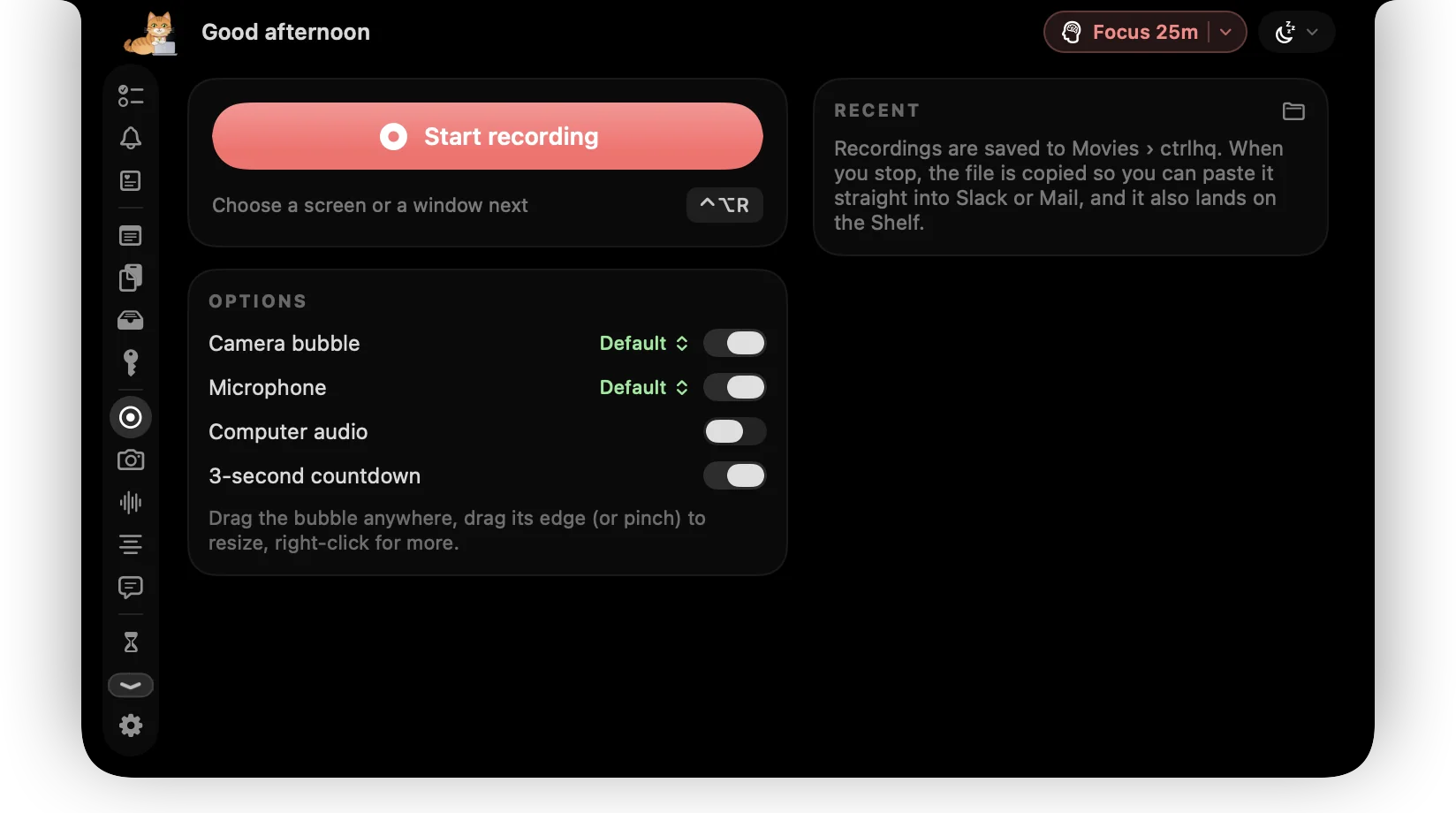
Screen recording with your face in a bubble, a teleprompter under the lens, and drawing, spotlight and zoom on screen. The video lands in Movies and on your clipboard, with nothing uploaded.
One payment for the recorder, the teleprompter and the annotation tools.
One-time purchase, lifetime updates
Already bought? Download
Sound familiar?
Your recorder wants an upload
You wanted an .mp4 to drop into your editor. You got a share link, a workspace and a monthly plan.
You can't read and look at the lens
The script is in a window, the camera is above it, and every take has your eyes drifting down the screen.
Viewers can't follow the pointer
Small text, a fast cursor and no way to circle the thing you're talking about, so you say “up here” a lot.
A small studio beside your camera
Recording, reading and pointing usually mean three apps. Here they open from the same place.
- Screen recordingRecord a whole screen or one window with your face in a round bubble, your mic, your Mac's audio or both. Pause and resume, and the .mp4 is saved to Movies and copied, ready to paste.
- TeleprompterYour script scrolls right below the lens at the speed and size you set, so you look at the audience while you read. It stays out of the recording.
- Screen annotationPen, highlighter, arrows and shapes over any app, strokes that fade by themselves, a spotlight on the pointer, a zoom lens and click ripples.
- Quick snapCheck your framing in the notch, and light your face with a ring of bright white around it.
- Keyboard soundsReal mechanical key clicks while you type on camera, in the apps you pick, with their own volume.
- Screenshot editorGive a screenshot a backdrop and shadow, size it for Instagram, LinkedIn or a 9:16 story, and black out emails and keys.
- Image converterConvert a thumbnail to WebP, AVIF, HEIC, JPEG or PNG and watch the file size change as you move the slider.
- Keep awakeKeep the Mac awake through a long export or upload, for 30 minutes, an hour, two, or until you turn it off.
Plus 36 more tools in the same app. See all 44
Try it
Read your script. Keep eye contact.
The text sits right under the lens. Pause for a breath, change the speed, drag a corner to resize.
Hey everyone, welcome back. Today I want to show you something small that changed how I work. My script sits right under the camera, in the notch, so I can read it and still look you in the eye. I pick the speed, I pick the size, and if I need a second I just pause. That's it. Let's get into it.
What a recording setup usually costs
Bought separately, these come to $88 once. ctrlhq is $24.99₹1,499 once.
- CleanShot X screenshot and screen recording app$35 once
- Moody notch teleprompter$39 once
- Presentify screen annotation app$14 once, or with Setapp
ctrlhq records to a file on your Mac. It doesn't host videos, make share links or edit a timeline.
Pay once. Updated for life.
Every tool on this page, and the rest of the app, for one payment.
Launch priceBlack Friday price · one-time purchase
Save $4.01 · 14% off while it lasts
Save ₹500 · 25% off while it lasts
Black Friday ends in
$29$24.99₹1,999₹1,499
One-time purchase Lifetime updates
Pay once, keep it forever, and get every future update free. Goes up to $29 after launchBlack Friday. Goes up to ₹1,999 after launchBlack Friday.
- Unlimited tasks and tracked time
- Every feature, no tiers: recording, meeting notes, teleprompter and more
- Lifetime updates
- Use it on 1 Mac
- Offline. No account, no subscription
- Native and lightweight: about 17 MB
- Export to JSON or CSV any time
Already bought? Download
macOS 15 Sequoia or later · Apple silicon & Intel
Buying for someone? Gift itQuestions
Where do recordings go?
The .mp4 is saved in Movies › ctrlhq and copied to your clipboard, so you can paste it straight into a chat or drop it into your editor. Nothing is uploaded.
Can I record my face and my screen together?
Yes. Record a screen or one window with your camera in a round bubble on top, with your mic, your Mac's audio or both.
Does the teleprompter show up in my recording?
No. Your script stays on your screen but out of screen shares, recordings and screenshots.
Can I draw on the screen while I record?
Yes. Draw over any app, spotlight the pointer, zoom into details and highlight clicks while you record or present.
Does it make a share link like Loom?
No. ctrlhq gives you the file, and where it goes is up to you.
Is it a subscription?
You pay $24.99 once. There's no subscription, and every future update is included.

Hit record from the notch.
$24.99₹1,499 once, no subscription. Black Friday ends in --d --h --m --s.
One-time purchase, lifetime updates
Already bought? Download
macOS 15 Sequoia or later · Apple silicon & Intel