 ctrlhq
For anyone tired of renting small utilities
Ten Mac utilities, ten renewals. Or one app you pay for once.
A cleaner, a clipboard manager, a file shelf, a display tool, a keep-awake app, dictation and a screen recorder. ctrlhq puts all of them in the notch for one payment.
Pay once this Black Friday and cancel the renewals.
One-time purchase, lifetime updates
Already bought? Download
Sound familiar?
Every small job has its own app
One for the clipboard, one for the disk, one to keep the Mac awake, one for the monitor's brightness. Each wanted its own purchase.
The renewals never line up
A yearly charge here, a monthly one there. None of them is big, and together they cost more than the apps you actually love.
The menu bar is full
Ten icons, ten background processes, ten update prompts, and you still hunt for the right one.
One app does these jobs
Each of these is a tool people buy on its own. In ctrlhq they open from the same hover.
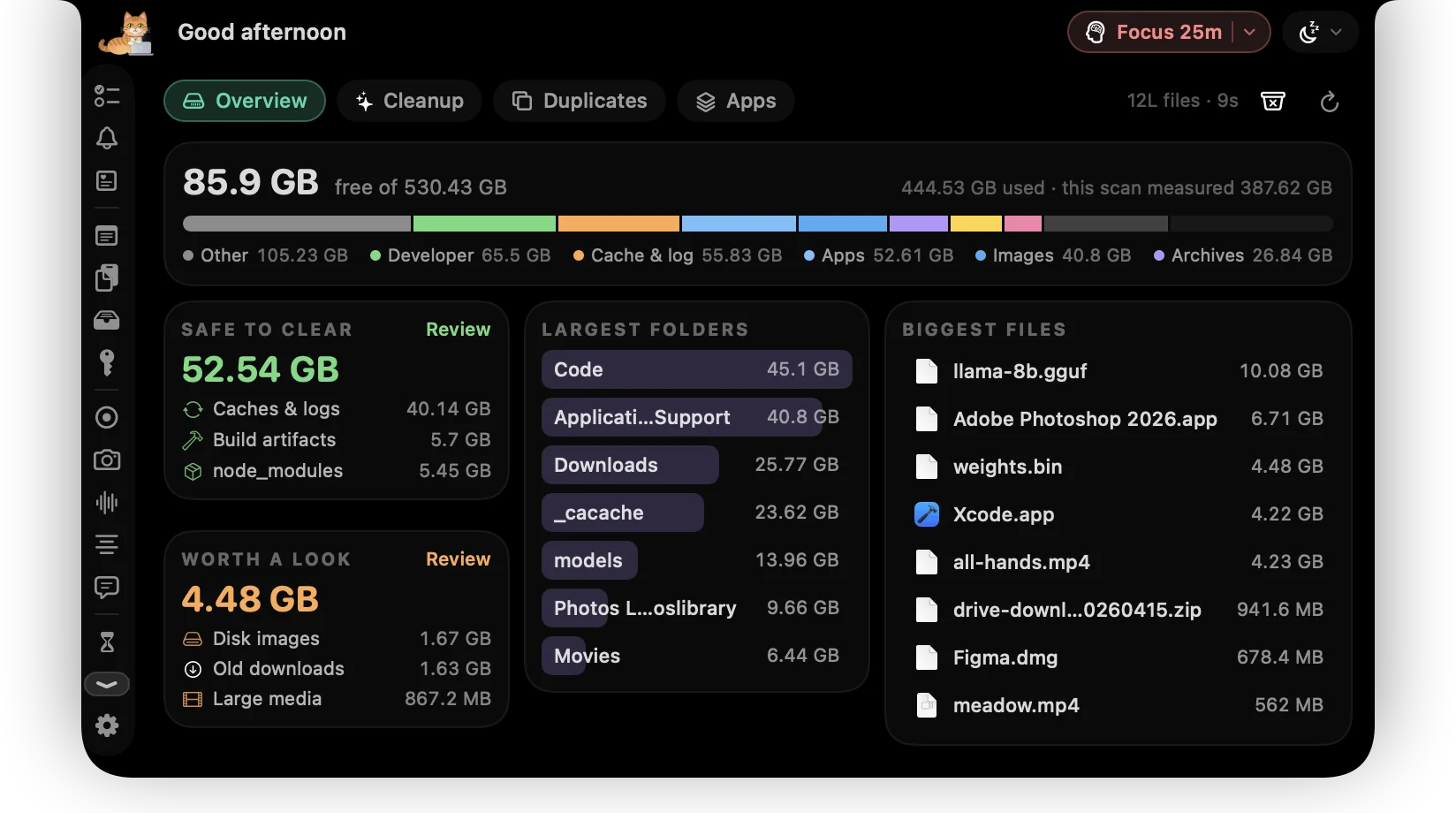
- Disk cleanupOne scan shows what's safe to clear, what's worth a look and the biggest files and folders. Nothing moves until you confirm, and then it goes to the Trash.
- App uninstallerUninstall an app with its caches, containers, preferences and launch agents, and switch off what starts at login.
- Clipboard historySearchable history for text and images, opened with ⌃⌥V in any app. It stays on your Mac.
- File shelfDrop files on the notch to hold them, then drag them out, move them to a pinned folder or AirDrop them.
- Display brightnessA brightness slider for every display, external monitors included, plus contrast and volume where the monitor supports them.
- Keep awakeKeep the Mac awake for 30 minutes, an hour, two, or until you say so, with one shortcut.
- DictationHold fn, talk, and tidy text is typed into any app. It's processed on your Mac and never uploaded.
- Screen recordingRecord a screen or a window with a camera bubble, your mic and the Mac's audio.
Plus 36 more tools in the same app. See all 44
Try it
Start with the disk
Most people find gigabytes on the first scan. See what's safe to clear before anything moves.
Safe to clear · apps rebuild these
66.6 GB free after
Everything goes to the Trash.
The stack it replaces
Bought separately, these come to $119 once plus $478 a year. ctrlhq is $24.99₹1,499 once.
- CleanMyMac Mac cleanerFrom $40 a year
- Paste clipboard manager$29.99/year, or $89.99 lifetime
- Yoink file shelf$8.99 once
- BetterDisplay display utilityFree, Pro $21.99 once
- Amphetamine keep-awake appFree
- Wispr Flow AI dictation appFree plan, Pro $15 a month or $12 a month billed yearly
- CleanShot X screenshot and screen recording app$35 once
- Granola AI meeting notes appFree
- Timing automatic time trackerFrom $10/month
- Presentify screen annotation app$14 once, or with Setapp
- Moody notch teleprompter$39 once
Each of these apps goes deeper at its one job than ctrlhq does. If you rely on a specialist feature, keep that app and drop the rest; the comparison pages say where each one is the better pick.
Pay once. Updated for life.
Every tool on this page, and the rest of the app, for one payment.
Launch priceBlack Friday price · one-time purchase
Save $4.01 · 14% off while it lasts
Save ₹500 · 25% off while it lasts
Black Friday ends in
$29$24.99₹1,999₹1,499
One-time purchase Lifetime updates
Pay once, keep it forever, and get every future update free. Goes up to $29 after launchBlack Friday. Goes up to ₹1,999 after launchBlack Friday.
- Unlimited tasks and tracked time
- Every feature, no tiers: recording, meeting notes, teleprompter and more
- Lifetime updates
- Use it on 1 Mac
- Offline. No account, no subscription
- Native and lightweight: about 17 MB
- Export to JSON or CSV any time
Already bought? Download
macOS 15 Sequoia or later · Apple silicon & Intel
Buying for someone? Gift itQuestions
Can one app really replace all of these?
For most people's day-to-day use, yes: clearing disk space, clipboard history, parking files, monitor brightness, keeping the Mac awake, dictation and screen recording. Specialist apps go deeper at their one job, and each comparison page says when to pick them instead.
Is an all-in-one app heavy?
No. ctrlhq is a native Swift app, not a web page in a wrapper, and the download is about 17 MB. It's one app running instead of several.
Do I have to use every tool?
No. Tools you don't use stay out of the way, and ctrlhq only asks for the permissions a tool needs when you turn it on.
Where is my data?
On your Mac. There's no account and no cloud. Clipboard history, recordings and transcripts never leave it.
What do I need to run it?
macOS 15 Sequoia or later, on Apple silicon or Intel. Dictation, voice commands and meeting notes need macOS 26 Tahoe; everything else runs on macOS 15 Sequoia or later.
Is it really a one-time payment?
You pay $24.99 once. There's no subscription, and every future update is included.

Cancel the renewals. Keep the tools.
$24.99₹1,499 once, no subscription. Black Friday ends in --d --h --m --s.
One-time purchase, lifetime updates
Already bought? Download
macOS 15 Sequoia or later · Apple silicon & Intel