 ctrlhq
Dictation
Hold fn, say it, and it's typed. Minus the ums.
Hold fn and talk. Let go, and your words are typed into whatever app you're in, with the ums gone and your corrections kept.
One-time purchase, lifetime updates
Already bought? Download
Shortcut fn
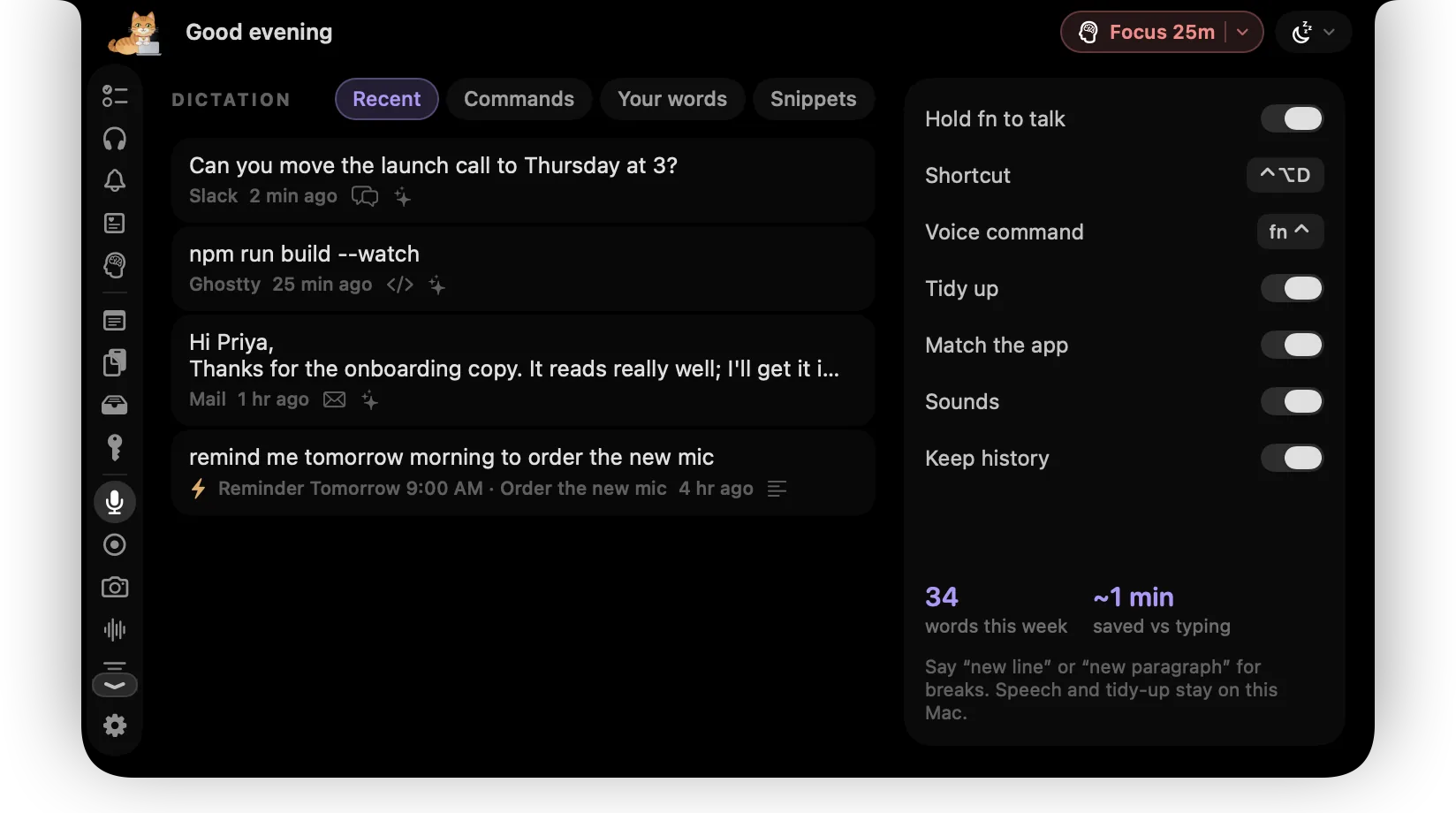
Talking is quicker than typing, but most dictation writes down exactly what you said: every um, every false start, and both versions of the day you changed your mind about.
ctrlhq listens while you hold fn and types when you let go. Apple's on-device dictation turns your voice into text, then a tidy-up pass removes the fillers, keeps only the version you corrected to, and fixes the punctuation, so what lands in Slack, Mail or your terminal reads like you typed it.
Try it
What you get
Every word stays on your Mac
Your Mac already has the hardware for this. Apple's on-device dictation turns speech into text and Apple Intelligence tidies it, locally. No audio is uploaded, and it works offline.
Hold fn, talk, let go
Push-to-talk on the key you already have. Double-press fn to go hands-free, then press it once more to paste. ⌃⌥D works too.
Fillers gone
Um, uh and their drawn-out cousins are removed, along with stammered repeats and filler "you know"s, without touching "I like it".
Corrections kept
"Monday, sorry, Tuesday" types Tuesday. "At 3, no, 4pm" types 4pm. "Scratch that" drops what came before.
Matches the app
Casual in Slack and Messages, full sentences in Mail and Gmail, and in a terminal "git commit dash m" becomes git commit -m.
Never changes what you said
The tidy-up can't swap a day, a number or a name. If it tries, or reads like an answer instead of your words, your own words are typed instead.
Your words and snippets
Add names and jargon so they're heard and spelled right. Say "my calendly" and get the link.
Your clipboard is safe
ctrlhq borrows the clipboard for a moment to paste, then puts back what was there. Dictations never land in clipboard history.
How it works
- 1Put your cursor where the text should go.
- 2Hold fn and talk. Dots under the notch move with your voice.
- 3Let go. The tidied text is typed in, and the notch closes.
Other dictation apps for Mac
Good standalone apps already do this one job. Here's how they compare, and where ctrlhq fits.
ctrlhq
In your notch
Hold fn to dictate into any app, with fillers removed and corrections kept. Every word stays on your Mac, and you pay once instead of every month.
$24.99 once
- Wispr Flow
AI dictation app
Cloud-powered dictation across Mac, Windows and phones, with team features. ctrlhq vs Wispr Flow
Free plan, Pro from $12 a month, billed yearly
- Superwhisper
AI dictation app
Custom modes and a choice of local or cloud models for power users.
Free plan, Pro $8.49 a month
- MacWhisper
Transcription and dictation app
Transcribing audio and video files, plus system-wide dictation.
Free version, Pro €64 once
- Apple Dictation
Built into macOS
Quick dictation as typed, without the tidy-up.
Free
Prices from each maker's website, checked October 2026. Spot something out of date? Tell us.
Questions
Does my voice leave my Mac?
No. Speech to text runs on Apple's on-device engine and the tidy-up runs on Apple Intelligence, both on your Mac. Recent dictations are kept in a file on your Mac, and you can turn history off.
What does it need?
macOS 26, the microphone, and Accessibility, which is what lets ctrlhq see the fn key and paste into other apps. The tidy-up uses Apple Intelligence; without it, fillers, spoken commands and simple corrections are still handled.
fn opens the emoji picker. What do I do?
In System Settings › Keyboard, set "Press 🌐 key to" to Do Nothing. Then fn is free for dictation. Or use ⌃⌥D, which you can rebind.
Will it answer my question instead of typing it?
No. It only tidies what you said. If the tidied version looks like an answer, a summary or a change of meaning, your own words are typed instead.
Which languages does it support?
The languages Apple's on-device dictation supports on your Mac. The first time you dictate in one, macOS downloads its model once.
Does it work in password fields?
No, on purpose. If a password field is active, the text is copied instead of typed.
Also in the notch
All featuresMeeting notes
ctrlhq notices a call and offers to take notes. Transcribed on-device, with a summary and action items.
Learn moreClipboard history
Searchable clipboard history for text and images. ⌃⌥V opens it in any app.
Learn moreKeyboard shortcuts
Global shortcuts for everything you do often. They work in any app and can all be rebound.
Learn more

Dictation, and everything else.
Every feature is in one app, for one price: $24.99 once, no subscription.
One-time purchase, lifetime updates
Already bought? Download
macOS 26 Tahoe or later · Apple silicon & Intel