 ctrlhq
For freelancers who bill by the hour
The timer you can't forget. Because it's always in view.
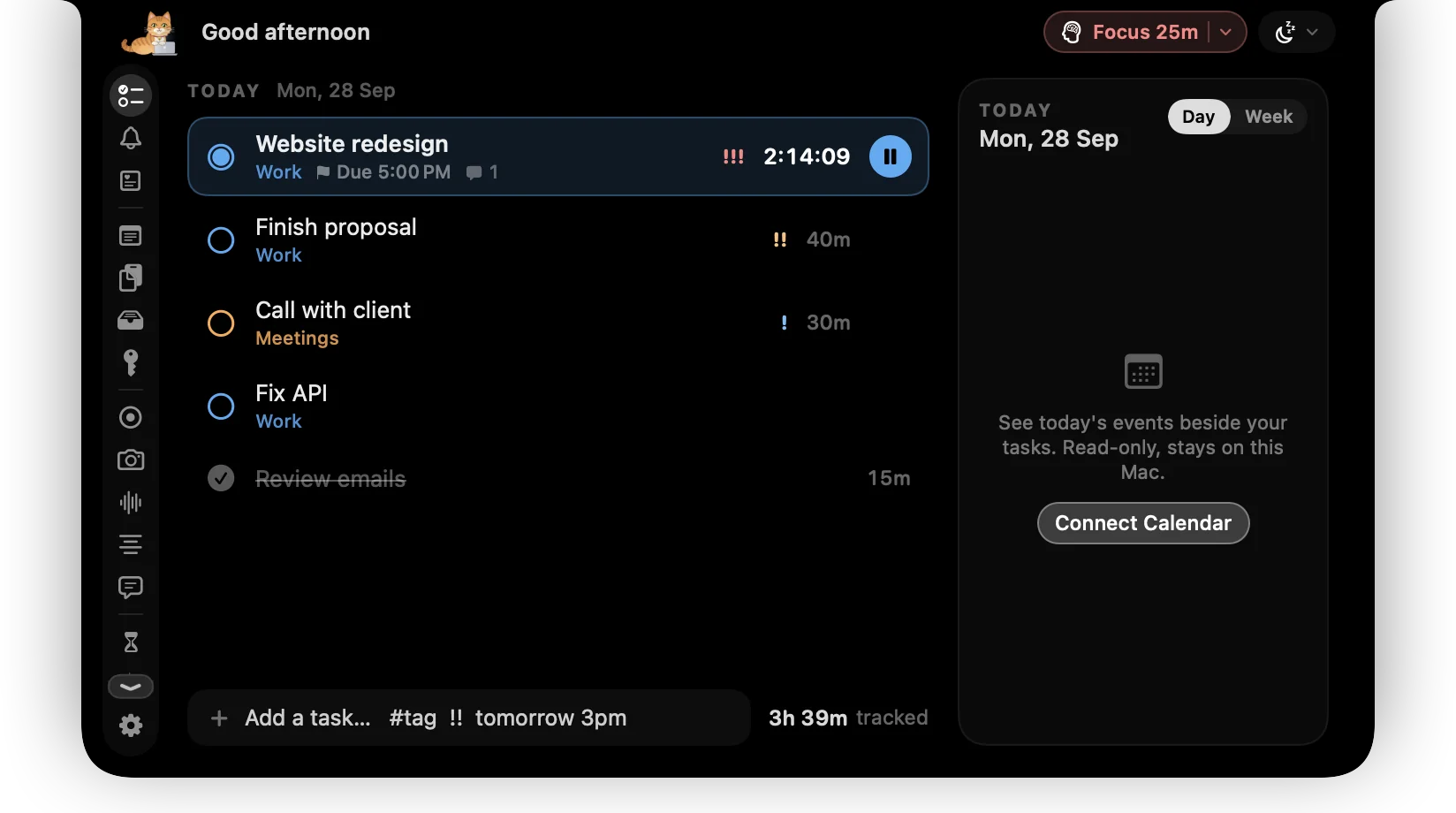
Your current task and its running timer sit beside the camera in every app. Walk away and ctrlhq asks what to do with the gap. At the end of the month, export the hours to CSV.
One payment instead of a time tracker you rent every month.
One-time purchase, lifetime updates
Already bought? Download
Sound familiar?
You forget to start the timer
The tracker is in a tab you closed, so the first hour of the day goes unlogged and you rebuild the timesheet from memory on Friday.
Or you forget to stop it
Lunch gets billed to a client, and now you're editing entries by hand and hoping the numbers look honest.
The tracker costs more every year
Most trackers are priced per month, for teams, with a web dashboard you never open. You work alone, on one Mac.
Built around the billable hour
Time tracking is where ctrlhq started. Everything here feeds the same timesheet.
- Time trackingClick a task to start its timer and click again to stop. The task and elapsed time stay beside the notch all day, so a running timer is never a surprise.
- Idle detectionStep away with a timer running and ctrlhq asks when you're back: keep the time, remove it, or remove it and stop. It can also stop the timer after 5 to 60 minutes idle.
- Time reportsTotals by category and by task for today, 7 or 30 days, with a timeline of the day. Export to CSV or JSON for your invoice or spreadsheet.
- Focus timerFocus sessions from 15 to 90 minutes on your top task. The minutes count as tracked time, so they show up in the report.
- Power toolPress ⌘⇧Space from any app, type the task a client just asked for, press Return, and you're back where you were.
- Meeting notesClient call? The transcript and summary are made on your Mac, and the action items can go straight into today's tasks.
- Screen timeSee where the untracked part of the day went, by app.
- RemindersWater, a walk, or your own reminders, counted in time you're actually at the Mac.
Plus 36 more tools in the same app. See all 44
Try it
Back from lunch? It asks.
No phantom hours and no editing entries afterwards. One click and the timesheet is right.
You've been away for 0 min
Keep tracking “Website redesign”?
What a time tracker usually costs
Bought separately, these come to $96 a year. ctrlhq is $24.99₹1,499 once.
ctrlhq tracks time on one Mac and exports it. It doesn't create invoices, store billable rates or sync to a team dashboard or a phone.
Pay once. Updated for life.
Every tool on this page, and the rest of the app, for one payment.

Launch priceBlack Friday price · one-time purchase
Save $4.01 · 14% off while it lasts
Save ₹500 · 25% off while it lasts
Black Friday ends in
$29$24.99₹1,999₹1,499
One-time purchase Lifetime updates
Pay once, keep it forever, and get every future update free. Goes up to $29 after launchBlack Friday. Goes up to ₹1,999 after launchBlack Friday.
- Unlimited tasks and tracked time
- Every feature, no tiers: recording, meeting notes, teleprompter and more
- Lifetime updates
- Use it on 1 Mac
- Offline. No account, no subscription
- Native and lightweight: about 17 MB
- Export to JSON or CSV any time
Already bought? Download
macOS 15 Sequoia or later · Apple silicon & Intel
Buying for someone? Gift itQuestions
Can I track time per client or project?
Yes. Tasks have colour-coded categories, and reports total your time by category and by task. Most freelancers use one category per client.
Can I invoice from ctrlhq?
No. ctrlhq exports your tracked time to CSV or JSON, and you bring that into your invoicing tool or spreadsheet.
What if I forget to stop the timer?
ctrlhq notices when you step away. When you come back it asks whether to keep the idle time, remove it, or remove it and stop. You can also have it stop the timer on its own after a set idle time.
Where is my time data stored?
In one JSON file on your Mac. There's no account, no sync and no server, and you can export it whenever you like.
Is there a web dashboard or a mobile app?
No, on purpose. ctrlhq tracks the work you do on your Mac, on your Mac.
Is it a subscription?
You pay $24.99 once. There's no subscription, and every future update is included.

Bill every hour you worked.
$24.99₹1,499 once, no subscription. Black Friday ends in --d --h --m --s.
One-time purchase, lifetime updates
Already bought? Download
macOS 15 Sequoia or later · Apple silicon & Intel