 ctrlhq
Time reports
See exactly where your time went.
By category and by task, for today, the last 7 or the last 30 days, with a timeline of your day.
14-day money-back guaranteeAlready bought? Download
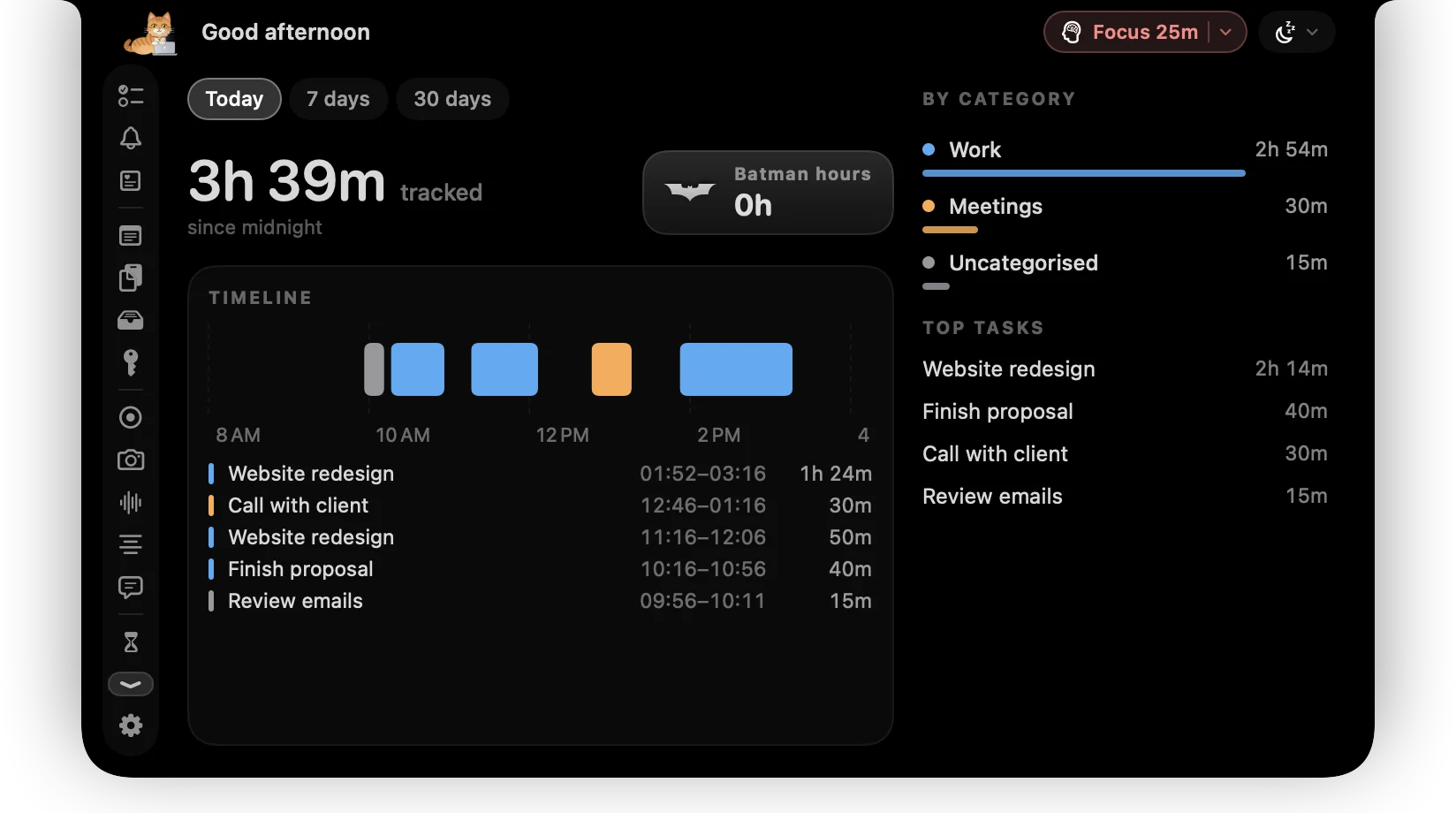
Tracking only matters if you look at it. ctrlhq's Stats tab turns your timers into a clear picture of the day, the week or the month.
Use it to bill clients accurately, see how much of the week went to meetings, or just find out where Tuesday went.
What you get
Today, 7 or 30 days
Switch the range and every total, chart and list updates.
By category and task
See the split between client work, admin and everything else, then drill into tasks.
A timeline of the day
Every tracked block laid out in order, so gaps and context switches are obvious.
CSV and JSON export
Take the raw numbers into a spreadsheet, an invoicing tool or your own scripts.
Questions
Is there a web dashboard?
No. Reports live in the app, on your Mac. Export to CSV if you need to share them.
Can I see time per task?
Yes. Open any task to see how long it was tracked today and in total.
Also in the notch
All features
Time reports, and everything else.
Every feature is in one app, for one price: $19 once, no subscription, and a full refund within 14 days if it isn't for you.
14-day money-back guaranteeAlready bought? Download
macOS 26 Tahoe or later · Apple silicon & Intel