 ctrlhq
Backdrop
Rain, a fire, a café. Whatever helps you focus.
Mix ambient sounds to work to. They start with your timer, step aside for music and calls, and Nook joins in.
14-day money-back guaranteeAlready bought? Download
Shortcut ⌃⌥B
A little background sound makes it easier to settle into work, but a browser tab of rain or a YouTube stream is one more thing to find, start and stop.
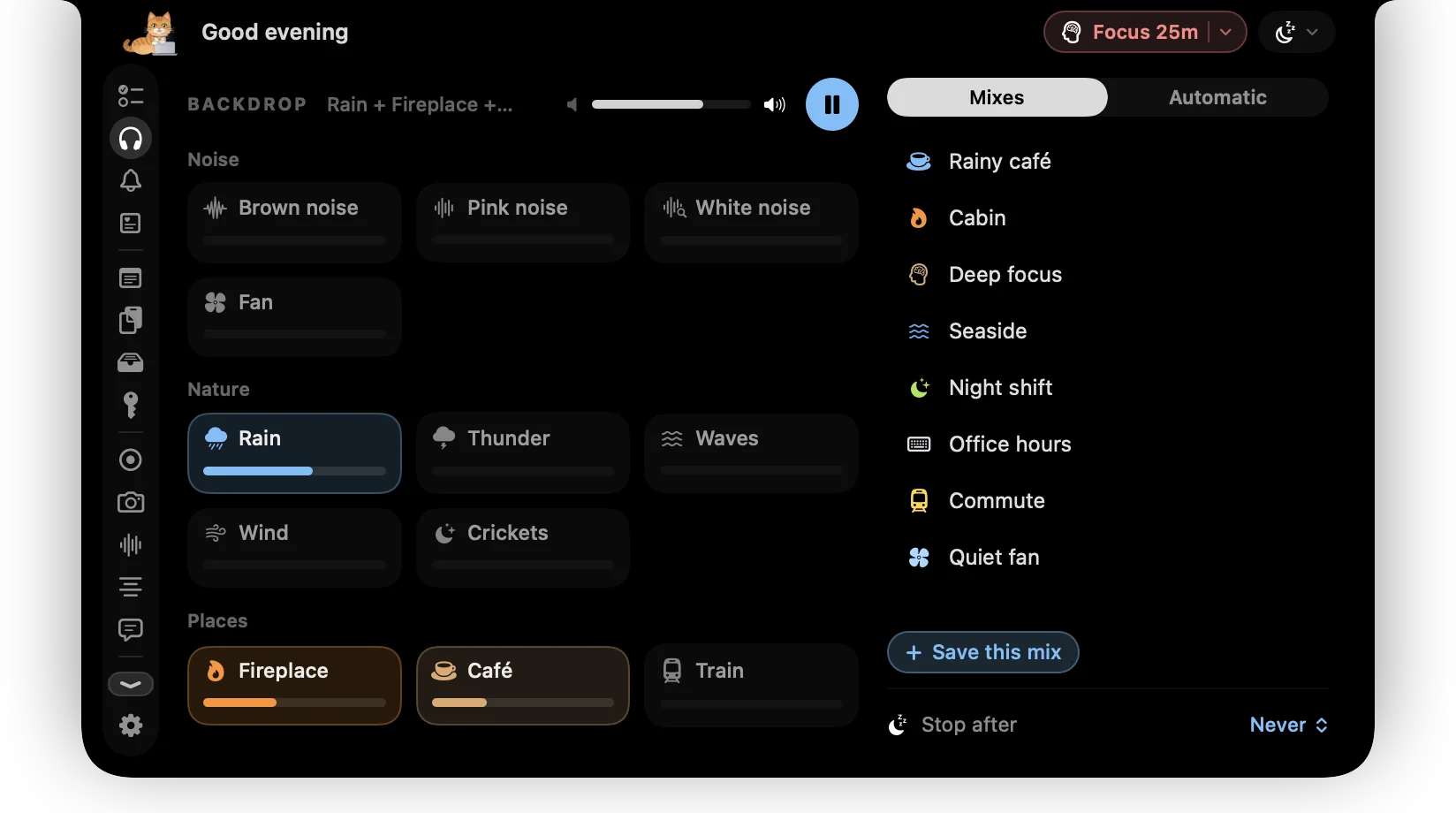
Backdrop lives in the notch. Mix a few sounds, save the mix, and let it come on when your task timer starts and fade out when it stops. While it plays, the sound's icon and a small equaliser sit beside the notch.
Try it
Rain + Fireplace · Nook puts up her umbrella
What you get
Mix your own
Rain, thunder, waves, wind, crickets, a fireplace, a café, a train, a keyboard and a clock, plus brown, pink and white noise, a fan and binaural beats. Each has its own level.
Saved mixes
Start from Rainy café, Cabin, Deep focus, Seaside and more, or save your own and switch in one click.
Follows your timer
Starts when a task timer or focus session begins and fades out when it stops. Give each category its own mix.
Changes with the day
Pick a mix for the morning, afternoon, evening and night, and Backdrop crossfades between them.
Steps aside
Drops to a third while Music or Spotify plays, pauses during calls, and fades back in afterwards.
Never the same loop
Crickets chirp at random around you, thunder rolls in now and then, and typing is reshuffled, so nothing repeats on a cycle.
Stop after
Fade out after 15 minutes to 2 hours, handy with a Pomodoro or at the end of the day.
Nook joins in
An umbrella in the rain, a campfire, a coffee in the café, headphones for noise.
Questions
Does it need the internet?
No. Every sound is built into the app and plays offline.
Will it drain my battery?
Barely. Sound is mixed with large audio buffers, so the Mac wakes far less often, and the audio engine shuts down completely whenever Backdrop is paused.
Do binaural beats need headphones?
Yes. Each ear hears a slightly different tone, so they only work with headphones. ctrlhq reminds you if you're on the Mac's speakers.
How does it know I'm on a call?
It notices when a call app like Zoom, Teams, Slack, FaceTime or a browser meeting is using the microphone, and pauses until the call ends.
Also in the notch
All featuresFocus timer
Start a focus session on your top task. ctrlhq tracks the time and calls the break.
Learn moreNow playing
Big artwork, controls, a scrubber and volume for Apple Music and Spotify, plus synced lyrics you can keep under the notch.
Learn moreNook the cat
Nook naps when you're idle, types when you do, and cheers when you finish something.
Learn more

Backdrop, and everything else.
Every feature is in one app, for one price: $19 once, no subscription, and a full refund within 14 days if it isn't for you.
14-day money-back guaranteeAlready bought? Download
macOS 26 Tahoe or later · Apple silicon & Intel